Can AI Agents build a graphics pipeline autonomously?
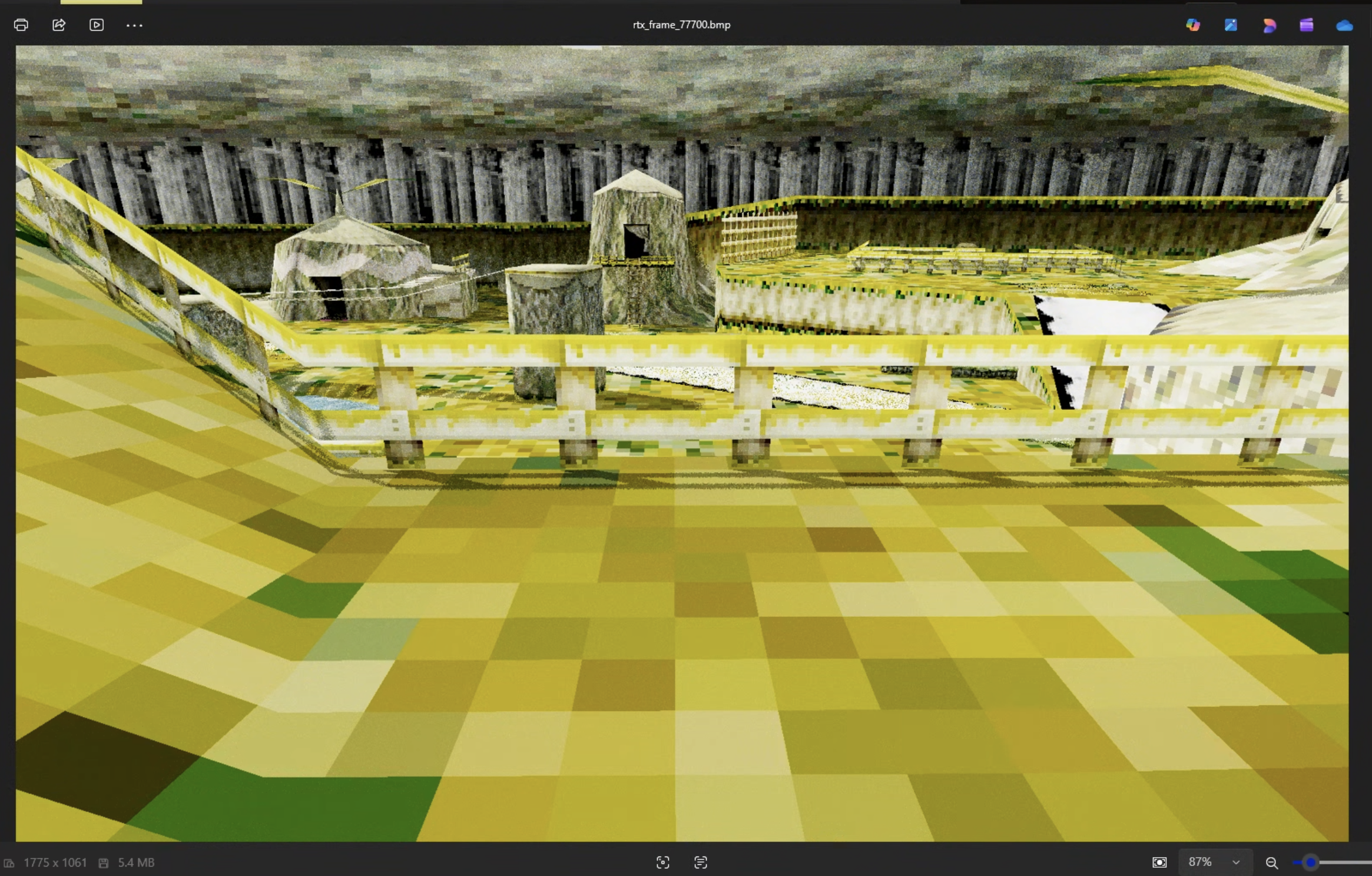
I started working on adding raytracing (RTX) to The Legend of Zelda: Ocarina of Time. As in my other posts, I’m generally trying to drive the project via autonomous LLM agents.
I was hoping the project could be as simple as running Claude Opus 4.6 in a loop, saying “implement RTX into this engine, make no mistakes.” I got surprisingly far with this technique. However, I started noticing that it hit a wall, and that it seemed to be bottlenecked by its ability to understand the engine’s screenshot output, identify issues, and figure out what to work on next.
Hence, especially with the new drop of Qwen3.5-35B-A3B, I ran an eval. Given an RTX output that I can easily identify problems with, see what problems the current multi-modal LLMs identify with the picture and grade them against my rubric.
Here’s the image again, zoom in and look at the shadows, or the buildings in the back:
The Rubric
This is output from Kokiri Forest, which is the starting area in Ocarina of Time. There were some obvious problems with the image, but it was already impressive how I’ve gotten results like this with basically a oneshot prompt that ran in 2 hours.
The Prompt
I’m working on adding raytracing to the game, Zelda Ocarina of Time. I’d like you to look at this image output and tell me:
- what features have been implemented?
- what problems are there with the output?
My own grading
I didn’t send this to the LLM, and instead was looking for it to analyze the image and notice these issues.
- Implemented
- Geometry looks good
- Textures exist and are mapped correctly.
- Shadows. Looks like it supports proper raytraced shadows, with a dynamic light source (the sun). There’s a small bug with the shadows being disconnected from their object.
- Has “Global Illumination” aka GI. If it didn’t have GI, the areas that are occluded from the sun would be completely dark.
- Problems
- Using nearest filtering instead of bilinear on textures. That’s why they look so “blocky” near the camera
- Some type of incorrect white texture above the fence
- GI: but not material properties. It’s why the scene is so yellow, but it being yellow / green isn’t incorrect. Otherwise, under surfaces would be pitch black
Evals
When evaluating model performance, I just copied in the image (full-size), and copied in the prompt and went ham. I posted the actual LLM outputs on my GitHub. Here are my results, ordered by score:
Gemini 3.1 Pro 9/10
Good
- Noticed the shadowing, and the fact that the light has been changed from static to dynamic
- Differentiated that there’s direct illumination
- Specifically called out nearest-neighbor texture filtering, and says that N64 would use bilinear or trilinear here
- Noticed the noise, called out that we either need to increase the SPP (samples per pixel) or add a denoiser
- Noticed something wrong with the “tent” in the right of the image. Called out the white & black problems
- Noticed the shadows are slightly detached from the fence
- Called out that everything has the same material property which is why the scene is so yellow. Pretty good explanation
Bad
- Misidentified the scene as Lon Lon Ranch
- Made up something about the skybox. Got confused with the trees in the back
- Made up something about UV mapping / stretched textures
OpenAI o3 8/10
Unlike the other models, in the thinking trace, o3 actually zooms into parts of the picture.
Good
- Notices the shadows and the dynamic light source
- Notices indirect bounce / GI
- Calls out the yellow tint and correctly thinks that there should be small tweaks to the albedo
- WTF, notices the water, and that there aren’t reflections
- Correct solution for blocky textures. Calls out anisotropic / trilinear / bilinear filtering
Bad
- Incorrectly calls out ambient occlusion
- Incorrectly thinks I’m using a denoiser
- Mistakes the trees for a skybox
Opus 4.6 6/10
Good
- Noticed texture filtering problem
- Lack of anisotropic filtering
Bad
- Misidentified where it is (Kakariko or Castle Town)
- Made up something about the skybox
Gemini 3.1 Flash 6/10
Good
- Noticed the shadows and their accuracy
- Called out GI, and said that it gives things a yellowish tint
- Noticed that there’s a sun and dynamic lighting
- Noticed sample noise, proposed SPP or a denoiser
Bad
- I think it made up something about ambient occlusion. It could be working but I don’t really see it
- Noticed the “voxelization” but didn’t give the right fix
- Incorrectly said the leaf of the Kokiri house’ is misrendered
- Calls out that exposures are blown out. I don’t think so. I think it’s just the error with the white texture over the fence. It does notice there’s something wrong here
- The fence isn’t filtered, though it says it is as well as the ground
Kimi K2.5 6/10
Good
- Identifies GI, yellow color
- Notices soft shadows
- Notices that undersides aren’t completely black, so there are multiple bounces
- Notices the noise problem, but not a great proposal besides SPP. Does call out denoising later
- Notices too yellow, suggests albedo stuff or BRDF stuff
Bad
- Misidentifies as Temple of Time. Weird!! Qwen did that too
- Incorrectly thinks there are other light sources besides the sun
OpenAI GPT 5.2 Thinking 5/10
Good
- Ok it does seem to notice the indirect lighting bounce
- Thinks it’s too yellow or white, and calls out the albedo problem
- Notices the noise, calls out denoiser or SPP
Bad
- Doesn’t seem to notice GI, or calls it “diffuse” lighting.
- Notices shadowing but doesn’t comment on lighting improvements
- Doesn’t attempt to locate the place
- Notices the texture problem, but doesn’t correctly ID the problem
Sonnet 4.6 4/10
Good
- Thinks there’s GI
- Noticed the “minecraft like” textures
Bad
- Misidentified the problem with texture filtering, thinks it’s something to do with UV mapping
- “Yellow color” which is actually fine. Yeah this was a problem with my ralph loop
- Misidentified an inconsistency with the lighting on the tower vs. tent
- “self shadowing problem” doesn’t exist
- Keeps saying that it’s overexposed and yellow
Qwen3.5-35B-A3B 2/10
Good
- Noticed that I’m rendering at a higher resolution than the original game
- Noticed no reflections. I’m not really sure why it said this
- Noticed everything is the same material
Bad
- Incorrectly identified the scene as the Temple of Time
- Incorrectly calls out a DoF effect
- Says there are no shadows. “Looks like a rasterized render with post processing”
- Notices the blocky textures, but recommends “better textures”
- Misidentified the skybox
- Calls out the fence is “flat” which is wrong because the original game was like this
MiniMax M2.5 - doesn’t support image input
Conclusion
The reason why this is important is if AI can’t do this, it can’t run autonomously in a loop for a hard task like “create a ray tracer for this game.” I have faith in its ability to “implement material properties” - but based on this eval, I don’t have faith in its ability to “improve the output.”
We’re getting there, but considering that o3 and gemini-3.1-pro were the leaders of the pack, it seems like we have a long ways to go for visual-based evals, especially on tasks harder than FE dev. Maybe some type of agentic system that combined different models could crush this. Something like:
- Claude Opus 4.6 for coding & task management
- Gemini 3.1 Pro for grading the image output (maybe via a Skill)